
Cut your chatbot costs and latency by 40% using local Guardrail models.
Reduce your reliance on expensive API calls by offloading guardrail-specific queries to small guardrail models that run locally, without a GPU.
December 12, 2025
It may or may not surprise you that, in most chatbots implemented through an LLM API, guardrail-related queries account on average for 40% of total API costs. And by the way, if you need a refresher on what guardrails are and why they are important, check out our previous post on guardrails.
Despite their high cost, guardrailing tasks are straightforward and easy to get right even for small models in the 0.1B parameters range (or even smaller). Making a call to an LLM API just to check whether a message is safe is effectively a waste of money.
The problem is all the more frustrating when you consider that any respectable chatbot should make not one, but two guardrail-related API calls for every user query: one to make sure the user query is safe, before it is fed to the chatbot, and the other to make sure that the chatbot output is safe, before showing it to the user.
Latency is another important factor to consider: every additional API call adds network latency by increasing the number of round-trips to the API server.
So why don't people use local chatbots?
"If guardrailing tasks are so easy to get right even for small models...", you may ask, "...then why doesn't everybody train their own little guardrail and save themselves tons of money?".
As is often the case in AI, the problem is data. While some of the content that guardrails should guard against are common to most users (profanity, hate speech, violence or self-harm, adult content, prompt injection and jailbreak prevention...) a large portion of the guardrail's behavior really depends on each user's specific needs: some users may need guardrails against legal or medical advice, others may want to keep away from mentioning competitors, others may want to avoid political topics, and so on.
Guardrail models won't just magically know what they need to guard against: they need to be taught. However, teaching them requires datasets with tens of thousands of labeled utterances, which is something that most developers (or even companies) don't have.
Regular chatbot implementation
Let's suppose we have a little online store, and we want to develop a chatbot that acts as a customer assistant. The chatbot should help customers track their orders, answer inquiries on available products and so on.
Since most developers would implement a guardrailed chatbot entirely through an LLM API, that's the
scenario we will be using as our starting point. We will employ OpenAI's GPT-4.1 API, but the
same principles apply to any other LLM API. The chatbot will be implemented as a FastAPI web
service, with a single /chat endpoint that receives user messages.
A bare-bone implementation may look like this:
from fastapi import FastAPI
from pydantic import BaseModel
from openai import OpenAI

client = OpenAI(api_key="YOUR_API_KEY")

app = FastAPI()

class ChatRequest(BaseModel):
  message: str

@app.post("/chat")
async def chat_endpoint(req: ChatRequest):

  user_msg = req.message

  system_prompt = "You are a helpful customer service assistant for an online store. Do your best to help users with their inquiries about products, orders, and services."

  response = client.chat.completions.create(
      model="gpt-4.1",
      messages=[
          {"role": "system", "content": system_prompt},
          {"role": "user", "content": user_msg}
      ]
  )

  reply = response.choices[0].message.content
  return {"reply": reply}
Cost & latency assessment of guardrail-free model
As of the time of writing, the GPT-4.1 API costs $2 per 1M input tokens and $8 per 1M output tokens. Since the system prompt we provided is 30 tokens long, if we assume that the average user message is 20 tokens long and the average chatbot response is 40 tokens long, the current chatbot implementation incurs a cost of $0.42 per 1K user messages, with an average measured latency of 1.4 seconds. Not too bad.
Adding guardrails
But here's the catch: except for the high-level guardrails embedded into every OpenAI model, this simple implementation doesn't include any kind of guardrailing. Our chatbot will do its best to answer user queries, even when they are out-of-scope or potentially harmful.
Say, for instance, that a user asks our chatbot to help him build a React component for his latest full-stack web application, asks for medical advice, or tries to get the chatbot to reveal confidential information about our online store. Such attempts are not only a potential security threat and legal liability, but will increase the overall cost of our chatbot, as the model will waste tokens trying to answer out-of-scope queries.
We could (and should), of course, refine the system prompt by instructing the chatbot to not answer any queries that are unrelated to the online store, but this naive security mechanism would be insufficient, since system prompts can be bypassed with simple stratagems (prompt injection techniques, various versions of "forget all previous instructions and..."). In order to make it impossible the users to bypass the security mechanism, any effective guardrail must be implemented as an external component.
In fact, to be safe we should implement not one, but two guardrails: one for the user query, before it is passed to the chatbot (to ensure the user does not input any harmful or out-of-scope content), and one for the chatbot output, before it is displayed to the user (to ensure the chatbot doesn't output any harmful or out-of-scope content).
Let's add the two-levels guardrailing system to the our chatbot:
from fastapi import FastAPI
from pydantic import BaseModel
from openai import OpenAI

client = OpenAI(api_key="YOUR_API_KEY")

app = FastAPI()

class ChatRequest(BaseModel):
  message: str

def input_guardrail(message: str):

  safe_topics = ["customer service", "product information", "order status", "returns", "shipping"]
  prompt = f"You are a guardrail model that ensures the user's message is appropriate for a customer service chatbot. Only allow messages related to the following topics: " + ", ".join(safe_topics) + ". If the message is inappropriate, respond with 'unsafe'. Otherwise, respond with 'safe'."

  response = client.chat.completions.create(
      model="gpt-4.1",
      messages=[
          {"role": "system", "content": prompt},
          {"role": "user", "content": message}
      ]
  )

  reply = response.choices[0].message.content
  return reply

def output_guardrail(message: str):

  unsafe_content = ["hate speech", "personal attacks", "sensitive information", "inappropriate language"]
  prompt = f"You are a guardrail model that ensures the chatbot's response is appropriate for a customer service context. Messages containing the following types of content are considered inappropriate: " + ", ".join(unsafe_content) + ". If the message is inappropriate, respond with 'unsafe'. Otherwise, respond with 'safe'."

  response = client.chat.completions.create(
      model="gpt-4.1",
      messages=[
          {"role": "system", "content": prompt},
          {"role": "user", "content": message}
      ]
  )

  reply = response.choices[0].message.content
  return reply

@app.post("/chat")
async def chat_endpoint(req: ChatRequest):

  user_msg = req.message

  # Input Guardrail Check
  input_check = input_guardrail(user_msg)
  if input_check == "unsafe":
      return {"reply": "I'm sorry, but I cannot help you with that."}

  # Generate Chatbot Response
  system_prompt = "You are a helpful customer service assistant for an online store. Do your best to help users with their inquiries about products, orders, and services."

  response = client.chat.completions.create(
      model="gpt-4.1",
      messages=[
          {"role": "system", "content": system_prompt},
          {"role": "user", "content": user_msg}
      ]
  )

  reply = response.choices[0].message.content

  # Output Guardrail Check
  output_check = output_guardrail(reply)
  if output_check == "unsafe":
      return {"reply": "I'm sorry, but I cannot help you with that."}

  return {"reply": reply}
Cost & latency assessment of guardrailed model
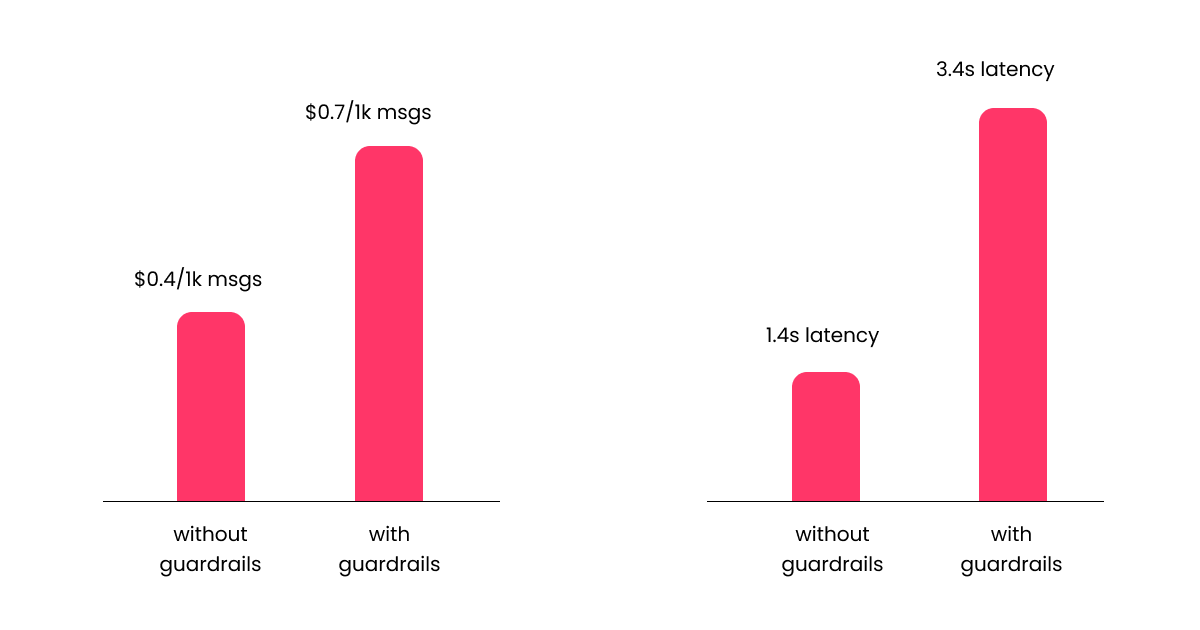
Boom, our chatbot is now much safer, but its cost has increased dramatically. For every user message, we are now making not one, but three separate requests to OpenAI's API: one for the input guardrail, one for chat completion, one for the output guardrail.
The price increase is not even the only issue here: latency has gone up significantly too. Except for cases in which the conversation stops at the input guardrail (if the user query is unsafe, that particular conversation stops there and never makes it to the chat completion or output guardrail), all user messages now go through three separate round-trips to the OpenAI servers instead of just one.
To put things into perspective, this new implementation consumes, on average, an additional 130 input tokens and 2 output tokens per user message. Assuming the same average number of tokens per user message as before, this translates into an overall cost of $0.7 per 1K user messages. Since the cost of the guardrail-free chatbot was $0.42 per 1K user messages, the guardrailed chatbot is around 67% more expensive. Things don't look better latency-wise: the new average measured latency is 3.4 seconds, which means our guardrailed chatbot is 2.5x slower than the guardrai-free version.
Offloading guardrail tasks to a local model with Artifex
We now come to the main point of this tutorial. If only we had a way to offload guardrail-related queries to a small guardrail model that runs locally, instead of sending them to OpenAI's API, we could reduce the number of API calls by two-thirds, thereby cutting costs and latency by a significant amount.
Such a solution is, in fact, possible with Artifex. Artifex is an open-source Python library for using and fine-tuning small, task-specific LLMs without the need for labeled data or GPUs.
We will again create two separate guardrails, one for the input message and one for the output message, then replace the API-based guardrails with the ones running locally.
First of all, install the Artifex library with
pip install artifexCreating a guardrail model with Artifex is as simple as the following:
from artifex import Artifex

gr = Artifex().guardrail

model_output_path = "./input_guardrail/"

gr.train(
  instructions=[
      "Queries related to customer service, product information, order status, returns and shipping are allowed.",
      "Everything else is not allowed."
  ],
  output_path=model_output_path
)
There. All we have done is passing to the instructions argument of Artifex().guardrail.train() the list of
allowed and not allowed queries. Read the two strings inside the list passed as the instructions
argument: they describe the same allowed and unallowed content that we passed to the
API-based guardrail's system prompt earlier.
The training process will take a few minutes. Once it's done, the model will
be saved to the ./input_guardrail/ folder, together with the synthetic dataset that was generated on-the-fly
during training, based on the instructions we provided.
Once the input guardrail model is ready, we can create the output guardrail model in a similar way:
from artifex import Artifex

gr = Artifex().guardrail

model_output_path = "./output_guardrail/"

gr.train(
  instructions=[
      "Responses that contain hate speech, personal attacks, sensitive information or inappropriate language are not allowed.",
      "Everything else is allowed."
  ],
  output_path=model_output_path
)
Now that both guardrail models are ready, we can modify our FastAPI chatbot implementation to use the local models instead of the API-based ones:
from fastapi import FastAPI
from pydantic import BaseModel
from openai import OpenAI
from artifex import Artifex

client = OpenAI(api_key="YOUR_API_KEY")

app = FastAPI()

class ChatRequest(BaseModel):
  message: str

input_guardrail = Artifex().guardrail
output_guardrail = Artifex().guardrail

input_guardrail.load("./input_guardrail")
output_guardrail.load("./output_guardrail")

@app.post("/chat")
async def chat_endpoint(req: ChatRequest):

  user_msg = req.message

  # Input Guardrail Check
  input_check = input_guardrail(user_msg)[0].label
  if input_check == "unsafe":
      return {"reply": "I'm sorry, but I cannot help you with that."}

  # Generate Chatbot Response
  system_prompt = "You are a helpful customer service assistant for an online store. Do your best to help users with their inquiries about products, orders, and services."

  response = client.chat.completions.create(
      model="gpt-4.1",
      messages=[
          {"role": "system", "content": system_prompt},
          {"role": "user", "content": user_msg}
      ]
  )

  reply = response.choices[0].message.content

  # Output Guardrail Check
  output_check = output_guardrail(reply)[0].label
  if output_check == "unsafe":
      return {"reply": "I'm sorry, but I cannot help you with that."}

  return {"reply": reply}
Our code is even simpler than before. We just instantiate two guardrail models with
Artifex().guardrail, then load the two fine-tuned guardrails we created earlier with the load()
method. We can then remove the two input_guardrail() and output_guardrail() functions entirely,
replacing them with calls to our newly loaded input and output guardrails. The rest is exactly
the same as before.
For more information on how to train, load and perform inference with guardrail models with Artifex, check out the Artifex documentation.
Cost & latency assessment of model that uses local guardrails
Since all guardrail-related inference is now happening entirely on our CPU, OpenAI will not bill us for it. Our chatbot cost is therefore back to its original level (prior to adding the API-based guardrails), which is $0.42 per 1K user messages, while its average measured latency is 1.6 seconds. This translates to a 43% reduction in costs and a 53% reduction in latency compared to the chatbot that uses API-based guardrails.

Wrapping up
In this tutorial, we have seen how to use Artifex to create small, task-specific guardrail models that run locally on our CPU, thereby cutting chatbot costs by 43% and latency by 53%, by offloading guardrail-related queries to the local models.
This approach is not limited to guardrail tasks only: any kind of specialized text classification task that would otherwise require expensive API calls can be offloaded to a small, locally running model created with Artifex, thereby reducing costs and latency across the board.
If you want to learn more about Artifex and how to use it, check out its GitHub repository and documentation.